All digital products are the most recent version at the time of purchase, with no possibility of free updates beyond the initial purchase.
After payment, we will upload the product file within 24 to 48 hours.
We provide free support for 7 days after your purchase.
If you have any questions, please contact us by email contact@plugcode.in or create a ticket on this page.
After the purchase is confirmed, download links will be accessible for 7 days.
Please note that all digital products presented on PlugCode are 100% original files. You will receive the original files from the developers.
The response time can take up to 6 hours.
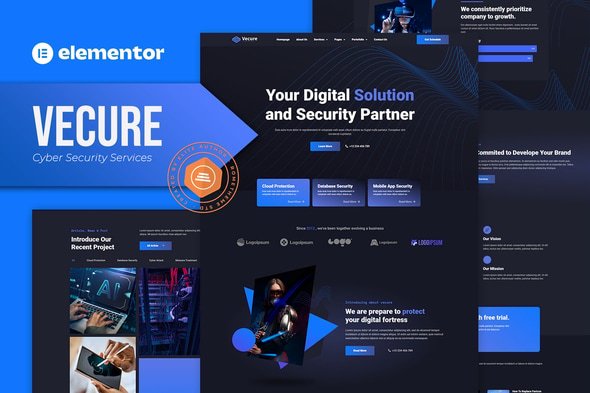
Vecure – Cyber Security Services Elementor Template Kit. Vecure is has 14 pre-built templates with fully responsive, modern, clean design and customizable theme. Vecure can be used for your stratup and service company, agency, creative, corporate, portfolio. Vecure as well as layouts for corporate to show their cool, modern and digital look to your amazing project.
Elementor Kit contains page content for Elementor page builder. This kit has been optimized for use with the free Hello Elementor theme but may be used with most themes that support Elementor.
Features:
- Cross-Browser Compatibility: FireFox, Safari, Chrome, IE9, IE10, IE11
- Using Free Plugins (Elementor Pro is not required)
- Fully Responsive Layout, Retina Ready, Ultra-High Resolution Graphics
- True no-code customization with drag and drop visual builder
- Customize fonts and colors in one place or fine-tune on individual elements
- 14 pre-built templates ready to use
- A clean, modern designs which can be adapted and used for any website design and layout
Templates In Zip :
- Homepage
- About Us
- Service
- Service Detailed
- Our Team
- Pricing
- Faq
- Contact Us
- Blog
- Single Blog
- Project List
- Project Detailed
- Header
- Footer
Required Plugins :
- Elementor
- Elementor Pro
- Skyboot Icon for Elementor
How to Use Template Kits:
- Install and Activate the “Envato Elements” plugin from Plugins > Add New in WordPress
- Download your kit file and Do not unzip
- Go to Elements > Installed Kits and click the Upload Template Kit button. You may also import automatically by clicking Connect Account to link your Elements subscription, then import under Elements > Template Kits.
- Check for the orange banner at the top and click Install Requirements to load any plugins the kit uses
- Click import on the Global Kit Styles first
- Click Import on one template at a time. These are stored in Elementor under Templates > Saved Templates.
- Go to Pages and create a new page and click Edit with Elementor
- Click the gear icon at lower-left of the builder to view page settings and choose Elementor Full Width and hide page title
- Click the gray folder icon to access My Templates tab and then Import the page you’d like to customize.
If you have Elementor Pro, headers and footers may be customized under Theme Builder.
Detailed Guide: https://help.market.envato.com/hc/en-us/articles/900000842846-How-to-use-the-Envato-Elements-WordPress-Plugin-v2-0
For further support, go to Elementor > Get Help in WordPress menu.
How to Import Metforms
- Import the metform block templates
- Import the page template where the form appears and right-click to enable the Navigator
- Locate and select the Metform widget and click Edit Form. Choose New, then Edit Form. The builder will appear
- Click ‘Add Template’ grey folder icon.
- Click ‘My Templates’ tab.
- Choose your imported metform template, then click ‘Insert’ (click No for page settings).
- Once the template is loaded, make any desired customizations and click ‘Update & Close’ The form will appear in the template
- Click Update
This Template Kit uses demo images from Envato Elements. You will need to license these images from Envato Elements to use them on your website, or you can substitute them with your own.
Vecure – Cyber Security Services Elementor Template Kit
In today’s digital-first world, cyber security services are more critical than ever. Businesses, startups, agencies, and creative firms need websites that not only look professional but also communicate trust, innovation, and security. This is where Vecure – Cyber Security Services Elementor Template Kit steps in.
Vecure is a 14-page pre-built Elementor template kit designed to help cyber security companies, IT service providers, and technology agencies build stunning websites in no time. With its 99% ready-to-use templates, cross-browser compatibility, and no-code customization, Vecure is one of the best solutions for creating a high-performing cyber security website.

Why Choose Vecure – Cyber Security Services Elementor Template Kit?
There are countless Elementor templates available, but Vecure has been crafted with a specific focus on cyber security services and IT agencies. Unlike generic template kits, Vecure provides industry-specific layouts, pre-designed pages, and responsive design that’s perfect for professional websites.
Here’s why Vecure stands out:
14 Pre-Built Templates (Homepage, Services, Pricing, Blog, Projects & more).
Cyber Security Focused Design – Clean, modern, and digital-first layouts.
No Elementor Pro Required – Works with free plugins.
True No-Code Builder – Drag-and-drop design with Elementor.
Cross-Browser Compatibility – Chrome, Firefox, Safari, Edge, IE9+.
SEO Friendly & Mobile Ready – Optimized for speed and Google ranking.
Key Features of Vecure
1. 14 Ready-to-Use Templates
Vecure includes all the essential pages your cyber security business needs:
With these templates, you can launch your website in hours instead of weeks.
2. No Elementor Pro Required
Unlike many template kits, Vecure does not force you to purchase Elementor Pro. It works perfectly with the free Elementor version plus free plugins like Skyboot Icons for Elementor.
3. Fully Responsive & Retina Ready
Vecure has been built with mobile-first responsiveness in mind. Whether your visitors are browsing from desktops, tablets, or smartphones, your website will look pixel-perfect.
4. True No-Code Customization
With Elementor’s drag-and-drop builder, you can easily customize layouts, colors, fonts, and sections without touching a single line of code.
5. Optimized for Cyber Security Agencies
Vecure is specially designed for IT, cyber security, and tech service providers. Its layouts reflect trust, innovation, and professionalism, which is critical in the cyber industry.
Who Can Use Vecure – Cyber Security Services Elementor Template Kit?
Vecure is perfect for:
Cyber Security Firms – Build professional websites for digital protection services.
IT Agencies – Showcase managed IT services and software solutions.
Startups – Launch fast, modern websites without heavy development costs.
Tech Consultants – Highlight expertise and pricing plans.
Corporate Agencies – Create sleek, modern business sites with zero coding.
Installation & Setup Guide
Installing Vecure is quick and beginner-friendly:
Purchase Vecure from ThemeForest or download from Plugcode.
Install and activate the Envato Elements plugin.
Upload the Vecure Template Kit ZIP file.
Import the Global Kit Styles first.
Import each page template (Homepage, Services, Contact, Blog, etc.).
Customize layouts with Elementor’s drag-and-drop editor.
Replace demo content with your own text, images, and branding.
Launch your website and start attracting clients.
SEO Benefits of Vecure
When building a cyber security website, SEO performance is key. Vecure is lightweight, fast, and optimized for search engines. With responsive design and retina-ready graphics, your site is more likely to rank higher on Google.
Additionally, Vecure includes structured layouts for service pages, pricing tables, and blogs, making it easier to target long-tail keywords like:
Cyber security services
IT agency website template
Cyber security Elementor template kit
Managed IT services WordPress design
Why Buy Vecure from Plugcode?
At Plugcode, you get exclusive benefits that make it the best choice over ThemeForest:
99% Discounted Price – Premium templates at unbeatable prices.
Free Setup Assistance – Get help with installation and demo import.
Lifetime Updates – Always stay compatible with the latest WordPress version.
24/7 Support – Dedicated customer service anytime you need.
External & Internal Links
Final Thoughts
If you’re looking for a modern, professional, and SEO-friendly template kit, then Vecure – Cyber Security Services Elementor Template Kit is your best option. With 14 pre-built templates, drag-and-drop customization, and zero coding required, Vecure saves you time, money, and effort while giving your cyber security business a strong online presence.
Whether you buy it from ThemeForest or Plugcode, Vecure is a 99% ready-to-launch template kit that empowers your brand in the digital space.